×

Move Ubuntu 10.04 Window Buttons from Left to Right with 1 Command

Move Ubuntu 10.04 Window Buttons from Left to Right with 1 Command: Perhaps the most annoying thing about Ubuntu 10.04 "Lucid Lynx" is the right-to-left window buttons (Minimize, Maximize and Close buttons) switch. The change has caused a lot of confusions, anger, and criticisms from even the most loyal Ubuntu enthusiasts.
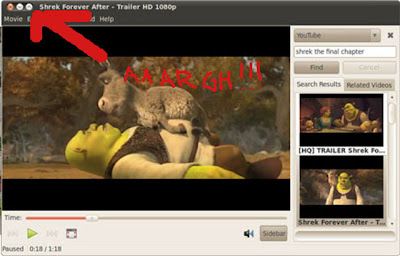

I personally wasn't happy about it not really because Ubuntu was trying to be like Mac OS X, but mainly because I'm just not used to having those pesky buttons at the left side. I know a lot of those who have just upgraded or installed Ubuntu 10.04 feel the same way too and would immediately want to move the window buttons back to where they belong, so allow me to help you with the simplest way possible.

Here's how you can move the window buttons of Ubuntu 10.04 from left to right using a one-liner:

Run Application Dialog (Alt+F2) or open a terminal and execute this command:

gconftool-2 --set /apps/metacity/general/button_layout --type string menu:minimize,maximize,close

That should do the trick. I hope you are happy now and have stopped cursing already :-)

I actually like it. My wife uses a mac (and ironically I find it cumbersome on there), but I got used to it really fast on my Lucid laptop. When I come to work and work on a Windows machine, I constantly find myself going to the left side when I have the mouse. Luckily, I'm a keyboard shortcut person anyway, so it hasn't been a huge deal.
You wouldn't happen to have any commands that would move the buttons to the left on Windows, would you? I actually like it on that side, but I find myself going to the wrong side when I'm working on my Windows computer at the office.
Anonymous #
looks like it's become the norm to work on a number of desktop (gnome, windows, mac, kde, etc)-- hope this continues so as to really -- i don't know -- make any desktop universally user friendly? :)
thank's for your trick.. :D
Anonymous #
brilliant!
Anonymous #
This comment has nothing to do with your post but I just wanted to comment on advertising on the right side of the page. I like it. The fact that its black and white means that it doesn't jump up and demand your attention, yet if I'm interested, its there and I can click on it. Its not intrusive. A good example to others.
Anonymous #
Thanks for the tip. Can you explain what it does and maybe show by example how to move them left again.
Anonymous #
much thanks for the tip. what a pointless change to a set of buttons i've gotten used to over the last several years... next thing you know, someone will put the buttons on the bottom. hell, i hope the ubuntu dev's don't see that... oh and my condolences to you mac people having the clickity click click thing on the left instead of right.
Anonymous #
do somebody have stored original value?
gconftool-2 --get /apps/metacity/general/button_layout

i'd like to try buttons on left side for few days... (running ArchLinux - not ubuntu :-)
Anonymous #
haha yeah, and condolences also to mac users who have their windows minimize instead of maximize when double clicking on the title-bar!
Bhaskar #
its nice. but how to move from right to left again.
Anonymous #
for lucid final default:
gconftool-2 --set /apps/metacity/general/button_layout --type string close,minimize,maximize:

for the lucid-in-development layout:
gconftool-2 --set /apps/metacity/general/button_layout --type string maximize,minimize,close:
patrickp #
Thanks..that was easy!
Anonymous #
cheers mate i quite like it on the left as it is close to all the open files, cheers for the tip
Anonymous #
Thank youuuuuuuuu!
Anonymous #
Thankyou soooo much
Anonymous #
Excellent! Thank you.
Why not put it in the center of the window to satisfy everybody? :)
Anonymous #
THANK YOU VERY VERY MUCH
Anonymous #
Thanks a lot
Anonymous #
Thankyou you are the best :D
Anonymous #
thanks worked like a champ
Anonymous #
Thanks, you made my day just a little easier.
Anonymous #
big thanks!
Anonymous #
Thank you.
Anonymous #
Mac people use macs; don't bother trying to convert them. The magic of Ubuntu lies in its ability to make converts to Linux of Windows folk while not selling out its Linux roots; until now! This shameful and heedless change for people *who are used to using Ubuntu!!!* should be mocked and regarded with sorrow for all who value this once stalwart distribution.
Anonymous #
Thank you. Glad to see someone posted a command line fix for this annoying little thing. I install allot of operating systems for people, and it's good to have some copy-paste fixes at the ready.
Cheers!
Anonymous #
Thank you. I have used Ubuntu since the 5.10 version and just upgraded from 8.04 to 10.04 today. Did not like the new position. This fix worked fine.
Anonymous #
Thank You! That was driving me CRAZY.
Anonymous #
you have no idea how much I appreciate your help... thanks a lot...
Anonymous #
Thx dude! Awesome one-liner. Sure beats opening gconf-editor and clicking your way down the tree every time!
Anonymous #
Well defined and simple command to help us simple people to get rid of a definite irritation. Thanks.
Anonymous #
Awesome, worked in an instant
Anonymous #
Thank you for this jun auza!
Mackay Smith #
'Mac people use macs; don't bother trying to convert them. The magic of Ubuntu lies in its ability to make converts to Linux of Windows folk while not selling out its Linux roots; until now! This shameful and heedless change for people *who are used to using Ubuntu!!!* should be mocked and regarded with sorrow for all who value this once stalwart distribution."

I'm fairly sure the magic of Ubuntu, and Linux all together is that people can use there system to do whatever they want. Maybe people like Linus, but also like the way Macs look. Stop being so close minded, fool.
Anonymous #
Thanks you very much!
Anonymous #
Thank you!!
Anonymous #
Thx dude! Awesome one-liner. Sure beats opening gconf-editor and clicking your way down the tree every time!
(Yes, I know I've said that before.. Just installed 10.10.) =p
Anonymous #
THANK YOU!!! THAT IS WHAT I WANTED!!! !!!!
BING BANG DONE!!!
Anonymous #
Thanks, very easy, now those that want them on the left can leave them there, and those of us who prefer them on the right can switch them easily. thanks again.
Anonymous #
just great solution
Anonymous #
Solution made my day, thanks! Although I cursed few times before I found this.
Anonymous #
lol, this solution helped a treat but in the opposite direction; Had not realized how used I had gotten to them being on the left that it actually annoyed me when they were not there while testing Mint on another computer.
Moved to left side... :D
Anonymous #
Thanks man, awesome!
Anonymous #
Ahhh.... GREAT!