×

Archive: September 2007

My Hipster In-law's Crappy iPod Shuffle

My Hipster In-law's Crappy iPod Shuffle: About a week ago, my wife’s mother got herself a brand new 2nd generation mint-green iPod shuffle. I find it really amusing that increasing number of people from the older age group are fast adapting to the latest gadget trend. But this article is not about my cool mother-in-law, it’s about the crappy iPod Shuffle and its software support.

As the only certified nerd in the family, I was asked to load some songs for the new iPod Shuffle. And without any hesitation, I happily agreed to help. I decided to do the syncing before I went to bed as I thought it will only take a matter of time to finish. But I was wrong. At about 11:30 PM, when I connected the Shuffle to the USB port it was not detected by my computer hence it can’t be recognized by iTunes. I visited Apple’s website for support then I followed several troubleshooting instructions. The computer finally discovered the shuffle and I lived happily ever after. Not! The computer did detect the Shuffle but not in iTunes. So once again I patiently searched for help and with a little luck on my side, iTunes finally saw the Shuffle after several tries. I can at last relax and just watch cartoons while waiting for the iPod to finish syncing or loading the songs. Not! The syncing stopped with the following error message “Disk cannot be read from or written to”. So I tried restoring the iPod but now it gives another error message that says “The iPod could not be restored. An unknown error occurred (1418)”. Now I’m beginning to worry as the Shuffle will be needed in the morning for my mom’s travel.


It was already 1am and I’m now using a special tool called Google to look for help. I bumped into several articles telling horror stories about the Shuffle. There was also that website called 1418hell.com. I tried some of their suggestions to help solve the 1418 error but it was no good. I finally just took matters into my own hands and restored the iPod by formatting it first in FAT, not FAT32 and then restored it by way of iTunes. But, I still can’t sync the iPod and it’s now already 2am. I even tried MediaMonkey and a program called iShuffle for syncing but to no avail. Now I want to eat that little shuffle as I was hungry and sleepy at the same time. I uninstalled and reinstalled iTunes a million times because that’s what Apple says until I gave up at around 4am.
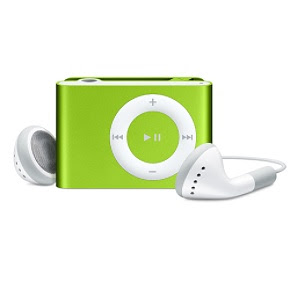
I slept tight for just an hour but it was good enough to clear my mind. I realized that the problem could be caused by iTunes; it could have messed up the Windows Registry. So I decided to use a computer with no previous iTunes installation which we luckily have in the office. Problem solved at 6:30 am.

I’m writing this article because I have been wanting to say to Apple to go to Hell. But I don’t want to say those bad words to them because I’m a good boy. I’m just hoping that Apple will fix these issues immediately because iPod, in this case the Shuffle is a great product and bugs like these are inexcusable. I pity those who have just bought their shiny new iPod Shuffle and are very eager to listen to it already but then have to experience the same problem that I had with it. There's nothing I can do but to wish them luck.

Continue reading →

Damn Small Linux: Big Heart for a Small Distro

In the world of technology, products that are fast, lightweight, and reliable are very much in-demand. Like in choosing software and web applications, more and more people prefer Firefox or Google for having these qualities. In computer operating system, there are few tiny and fast Linux distros with huge potential to succeed. The most popular among them is called Damn Small Linux. --No, I’m not cursing because that is its real name.

Damn Small Linux (DSL) is a mini Linux Desktop, about 49.5 MB or 51,941,376 bytes to be exact. Indeed the name speaks for itself. But don’t be deceived by its miniscule size, because deep beneath its core is a powerful and complex monolithic Linux kernel capable of performing highly efficient tasks. That is why I always keep a DSL nearby, like the older 3.0 version I already have. I realized that it's about time to upgrade to the most recent stable version of DSL which is 3.4.3. So I did the download then tested it through VMWare. The following is my quick evaluation of this distro:

Test Machine Specs:
Board: Intel D101GGCL
Processor: 3 GHz Intel Pentium 4 with HT Technology
Hard Drive: Samsung 80GB with 10GB allocated to VM disk
Memory: 1.5GB 400 MHz DDR with 512MB allocated to VM memory
Graphics Card: On-board

Intro:
Damn Small Linux is made in the USA by John Andrews and was first released on April 15, 2005. It is based on Knoppix and therefore has a Debian blood. Its primary goal is to provide a capable and easy to use desktop despite the size. Surprisingly, it is highly ranked at number 10 in Distrowatch, in fact higher than Knoppix and beating maybe hundreds of other much bigger-sized distributions.


Installation:
The download mirrors for DSL can be found here. Once the ISO image is loaded, you will have a choice to try several boot preferences. I tried the “dsl-tohd” option which will supposedly install DSL into my VM disk but didn’t. I already expected this to happen because at present, DSL developers are still working on improving hard drive installation. So I just booted DSL without a boot option parameter or in a normal way and was inside its Fluxbox desktop in a matter of seconds with USB, CDROM, audio and Ethernet working.


Look and Feel:
The Dillo browser will start opened by default which gave me the opportunity to read the DSL manual first. The application icons are well-arranged with just a click away to open a selected program. I always love its geeky FWM desktop but it may look funny or difficult to the eyes of some Windows or Mac users. Though it doesn’t have a sleek desktop like KDE or Gnome, its included themes and wallpapers are good enough and its responsiveness is exceptional even in the VMWare environment.


Package Management:
DSL has crammed sufficient amount of pre-installed open source programs inside the live CD. It includes useful applications like MP3/MPEG player, FTP client, web browser, games, spreadsheet, word-processor, text-editor, .pdf reader, DHCP client, PPP, PPPoE, web server, and calculator just to name some. Plus, downloading and installing additional sofware is relatively easy using MyDSL Extension Tool with the help of Debian's Advanced Packaging Tool (APT) and Synaptic. For testing, I downloaded Abiword and it installed successfully without a snag.


Stability:
For a live CD, I would say that DSL is pretty stable and secure. My older version of DSL was very dependable so I would expect this new one to be even better. I tried running several of its applications like Tetris and Firefox and they were going smoothly and flawlessly like in a normal desktop that we are used to, and perhaps even faster at times.

Conclusion:
Damn Small Linux is a very handy tool every computer owner must have. Its reliable ability to allow you to rescue a broken system or serve as a Linux backup software, paired by its high portability made it so much valuable. All in all, it is a damn great distribution worthy to be applauded. Now I’m cursing with excitement.

Continue reading →

Linux Distro War: Sabayon vs. Mint

Linux Distro War: Sabayon vs. Mint - A lot of people have been pairing and matching their favorite distros with the hope of finding out which is better or superior among their choices; and I'm one of them. I often visit different forums or do a search on Google looking for answers and curious about the real winner among my favorites.

I have recently reviewed Sabayon 3.3b Mini Edition and Mint 3.0 Light Edition. As we all know, they are two of the most promising and hottest Linux distros today. They are currently ranked number 5 and 6 respectively on Distrowatch. I know more and more people have been pairing these two that is why I'm starting a distro war. I'm rating Sabayon and Mint based on the tests I made to find out who has the clear edge.

Distrowar Arena (Test Machine Specs):
Board: Intel D101GGCL
Processor: 3 GHz Intel Pentium 4 with HT Technology
Hard Drive: Samsung 80GB with 10GB allocated to VM disk
Memory: 1.5GB 400 MHz DDR with 512MB allocated to VM memory
Graphics Card: On-board

Tale of the Tape:
Distro Name:---------------------------Sabayon Linux----------------Linux Mint
Origin:-----------------------------------Italy-----------------------------Ireland
Age (Since Version 1):-------------------?-----------------------------1 YR
Package Management:---------------SRC (Portage)----------------DEB(Debian)
Default Desktop:-----------------------KDE----------------------------GNOME
Installation:-----------------------------Graphical(LiveCD)-----------Graphical(LiveCD)

Speed Test:

Installation Time- Winner, Sabayon!
Boot/Startup Time - Winner, Sabayon!
Responsiveness- Draw!

Decoding: In VMware, it only took about 15 minutes to install Sabayon against 20 minutes in Mint. The Boot/Startup Time, measured from Grub to desktop, took 58 seconds for Sabayon and 65 seconds for Mint. It's a draw for Responsiveness due to fact that both distros are light and fast and I can't see a considerable difference between the two.

Aesthetics:
Default Theme- Winner, Mint!
Extras- Winner, Mint!
Artwork- Winner, Mint!

Decoding: Mint is my winner in all Aesthetics Category. The default theme is pleasing to the eye with several extra Mint wallpapers available. The artworks are sleek and polished like its boot-splash screen and log-in menu.

Features:

Pre-installed Applications- Draw!
Available Packages from Repo- Winner, Mint!
Ease of Use- Winner, Mint!

Decoding: The Pre-installed Applications Category is deadlocked because both have several important features installed by default like the multimedia capability of Sabayon and the key softwares found in Mint. The Debian/Ubuntu repositories have all the good and latest stuff available for Mint compared to the sometimes dated Gentoo packages. Ease of Use is hands down to Mint for being newbie-friendly.

Stability:
Hardware Detection- Draw!
Software Maintenance- Draw!
Error Handling- Draw!

Decoding: I can only give a draw verdict in all of the "Stability" sub-categories because I have never used Mint and Sabayon long enough to declare a clear winner. But based only on my initial tests, I found out that both of them are very much capable and are generally stable for productive uses. I hope the readers can fill in the gap.

Final Score:
Mint = 5
Sabayon = 2
*Winner Mint!

Conclusion:
The results are only based on my own opinion and were solely based on the tests I made. Mint may have won the war but the DVD version of Sabayon might have all the necessary weaponry it needs to beat Mint. What do you think?

Continue reading →

Computer User Profiling

Computer User Profiling: In software engineering, performance analysis, more commonly called profiling, is the investigation of a program's behavior using information gathered as the program runs. Its usual goal is to determine which parts of a program are to optimize for speed or memory usage.

In criminology, criminal profiling, is a behavioral and investigative tool that helps investigators to profile an unknown subject or offender.

I made my own kind of profiling, and I will call it computer user profiling. I will analyze computer users' behavior and environment according to their classification. My goal is just for fun and I never did any research or survey for this one. But, I'm using 1/4 of my brain in writing this article to put a little sense to this .

  • The Office Type
They are the kind of users with mainly basic tasks like word processing or just plain internet browsing. Most of them are around 18-60 years old of which, about 70 percent are women.They are using beige-colored PCs with an average clock speed (Intel) of 1 GHz, and are very much contented with their 15 inch or smaller PC monitors. Majority of them uses Windows but don't know who Bill Gates is. They don't or can't do simple OS maintenance tasks that's why when the "blue screen of death comes", they go straight to a technician.

  • The Artist Type
These users spend their time with the computer mostly for photo editing, sketching or for painting. Their ages are usually around 16-35 years old and about 60 percent of them are men. Their computers have an average clock speed (Intel) of 2 GHz. They use larger display usually 17 inch monitors or bigger and around half have dual monitor setup. Majority have Photoshop installed and most of them may have a little knowledge in computer maintenance. They also back up their files occasionally because they value their saved files a lot.

  • The Multimedia Type
They are the type of users who are usually watching movies, internet TVs, and are listening to MP3s from their computer. They usually are those who love to download music files (legal or not) and video files( porn or not) from the internet. They are around 18-40 years old and most of them are male, about 75 percent. They have faster computers, with average Intel clock speed of around 3 GHz and mostly using 21 inch widescreen monitors. They have plenty of multimedia software installed like crappy iTunes, PowerDVD and MediaMonkey. Most of them can do computer maintenance and troubleshooting because they always get viruses from their downloaded porn.

  • The Gamer Type
The users on this group are spending countless hours playing the latest and most popular games. Their ages are ranging from 15-35 years old. Most of them have computers that are super fast, using dual or quad core processors with the latest GPUs, and their monitors are 19 inches on average. Most of them are using Windows because their games are only compatible with it. They are capable of doing maintenance tasks and even troubleshooting as a result of spending a lot of time with their computers.

  • The Geek Type
These type of users are enslaving the computer for themselves. They mostly tweak it, hack it, and program with it commanding it to perform different tasks. Most of them are around 16-40 years old. They own two or more computers and usually have the latest dual or quad core processors. They have a dual or triple monitor setup with an average screen size of around 19 inches. Their choice of OS is Linux and are very passionate about it. Some are also using Windows but are not that passionate about it. They usually write silly articles like this one.

I wonder what type of user you belong to?
A drug user maybe? (he he) just kidding, and please just say NO to it.

Continue reading →

Sabayon, the Gentle Gentoo

Sabayon, the Gentle Gentoo: Gentoo, formerly known as Enoch Linux is one of the pioneers among the Linux distributions. It is well-known and loved for its speed (the Gentoo species is the fastest swimming penguin), and hated for its unfriendliness with Linux newbies. Thus, many flavors of Gentoo have been created including this highly capable one named Sabayon.

Every now and then, I’m searching for a perfect Operating System worthy to replace my OpenSuse 10.1. I have chosen to try out Sabayon Linux as I have already used Gentoo before and was quite impressed with it. I downloaded the Sabayon x86 3.3b Mini Edition live CD then installed and tested it via VMWare Workstation. So here is my own view and assessment of this distro:

Test Machine Specs:
Board: Intel D101GGCL
Processor: 3 GHz Intel Pentium 4 with HT Technology
Hard Drive: Samsung 80GB with 10GB allocated to VM disk
Memory: 1.5GB 400 MHz DDR with 512MB allocated to VM memory
Graphics Card: On-board


Intro:
Sabayon is made in Italy and created by Fabio Erculiani. He named it after an Italian dessert called Zabaione. The reason behind this tasty name is yet unclear but Linux users’ appetite for Sabayon can’t be denied as it is currently ranked number 5 on Distrowatch.com. Sabayon’s main aim is to transform a computer into a powerful Gentoo Linux system in less than 5 minutes.


Installation:
The link to the download site for Sabayon Linux is here. There are variety of installers to chose from which includes the DVD and Mini Edition supporting processors with 32 and 64 bit architectures. However, I would recommend the DVD for beginners for a reason that I will disclose later on. Anyway, the installation on my VMware System using the Mini live CD was completed in about 15 minutes with a unique feature that will let you update the installer before you start. Thanks to Anaconda, only few easy steps were necessary for the installation. It would have been a different story if it was done in an old Gentoo way. After the installation, it rebooted smoothly with all virtual hardwares detected. The audio, floppy, cdrom, ethernet, and usb controllers are working well.


Look and Feel:
Sabayon is short of being artistic in this edition. Most themes and wallpapers included are part of KDE by default. They could have added a few extras. Though I like the default Sabayon theme, I'm not that much of a KDE fan. The only good part is that it comes with Beryl which can be easily enabled. So if you have a capable video card, then you are just a few clicks away to eye-candy insanity.


Package Management:
Now here's the sad part for the newbies; The mini edition doesn't come with adequate software applications installed off-the-shelf. There's no Gimp, AbiWord and OpenOffice, just to name a few. Even though you can use a graphical portage package manager with a funny name called Kuroo to add or maintain software in Sabayon, it is not as easy as you think compared with say Ubuntu, PCLinuxOS, or OpenSuse's package management systems. That is why I'm recommending the Live DVD installer for beginners because it is pre-installed with plenty of useful applications to choose from for free, of course.


Stability:
Gentoo is considered one of the most stable if not the most stable distro ever. I was not surprised that Sabayon Linux inherited its quality. Though I have not tried Sabayon long enough, I can already say that it can be reliable for a long period of time based on the initial tests I made which includes running several applications simultaneously and probing its hardware support. In addition, I was also very amazed with its speed. It is very fast indeed, with a start-up loading time faster than any other distro I've seen so far.


Conclusion:
Sabayon is certainly not for everyone. But because of its quality, versatility and many advanced features, it is undeniably worth a try. I would recommend Sabayon to Novice users and to those who are bored with their Ubuntu or PCLinuxOS distro. But for experts or advanced users, you may also utilize Sabayon as a Linux web server.

To those who are just migrating from Windows to Linux , in short extreme newbies, don't ever think of touching it. Sabayon may sound sweet, but when tasted it could lead to a bitter experience.

Continue reading →

Hasta la vista, Windows Vista

Hasta la vista, Windows Vista: Today, I’m thinking of terminating my Windows Vista partition and reinstall my XP back into my main workstation. Although I have some essential Vista applications installed, I don't mind because I can still install them through Windows XP.

Here is a list of some of Vista's annoyances and setbacks that made me think of switching:

  • Irritating User Account Control box that appears every time I want to access programs that Vista doesn’t recognize, even though I have already allowed it to run several times. Computers are dumb enough. Why did Microsoft made it even dumber?
  • Poor GUI like the Power button should have a shut down function by default and not sleep function; it is kind of confusing to many. You will need magic trick from the how-to-geek to change it.
  • Shuts down when clicking the shutdown button, but without asking any question or prompt. I have unknowingly or accidentally clicked the button several times and it’s really frustrating.
  • Slow start-up after installing updates. I know it’s normal but they could have done better.
  • Crappy Local Area Networking. Local computers on my network appear and disappear.
  • My also disappearing DVD drive. I have to shut down and reboot to see it again. The problem started right after I installed Vista and have to edit the registry to see my optical drive. It was fixed but still vanishes every once in a while.
  • Still lacking software and driver support even after 8 months of its release; like My 5.1 speaker system don’t sound that good than it was on XP.
  • VMWare is running so sluggish in Vista. It’s slower than a walking turtle.
  • Are there anymore Ultimate Extras coming? Not that I need it, but can we have our money back?
  • Slow file transfer between my removable devices and computer.

Right now I’m still contemplating on when I will do the annihilation. I heard that there’s a new feature coming up this September 27 of their Windows Media Center which is a part of Vista Ultimate Edition. They said it will let users watch free high quality Internet TV. So I guess I have to wait and see. After all, it’s only a couple of days away.

Continue reading →

I Want my Google Korea, Now!

I Want my Google Korea, Now!: As some of you may already know, Google Korea had its website redesigned with a look so complex and different from the rest of the world.

The reason for this is the lack of Google’s market share in one of the most technically advanced countries on Earth. Well, South Korea, with high-speed internet access, heavily broadcast online gaming and such, caused this redesign; “It was important where our classic minimalism wasn’t working that we adapt,” Google’s Marissa Mayer told Search Engine Land. You can visit Google Korea to see their new animated website.


As for me, I don’t want Google's classic minimalism anymore. It was only good for the Web 1.0, the time when slow dial-up connections are widely used and majority of the users were just beginning to know or use the revolution called the Internet. But folks, we are now living in Web 2.0 and Google should adapt too.

I want access to my Gmail, Calendar and Blogger accounts all in one page, in Google’s home page that is because Google is my portal to the word like most of us do. Some might suggest that I can always install Google toolbar for easy entry to these services or I can just use iGoogle and have a customized page. But for me, I don’t want any more Firefox extensions or toolbars on my browser because it is cluttered and way heavy enough. To name a few extensions, I have Web Developer, SeoQuake, Firebug, YSlow and more installed.

There are a few Google prototypes that are appearing today, based on the Korean design or identical, but minus the animation; see screenshots below or click on the links here and here to visit the actual site.


They have the minimalistic look but were enough to satisfy my wants. I'm really hoping for a worldwide change in Google's main site design. After all, it’s not that bad to add a little complexity to its good old simplicity. What do you think?

Continue reading →

Linux Mint 3.0: A Date with Cassandra

Linux Mint 3.0: A Date with Cassandra - Before my wife gets mad at me, she should read this first: Cassandra is the name of the latest edition of Linux Mint. --It is an Ubuntu-based Linux distribution. Just a little fact, the past versions of Mint have been named Ada, Bianca, Bea, and Barbara. The next release name after Cassandra is Celena, which is currently in beta. If you want to know more and why the girls name, read this interview of the creator of Mint.

Cassandra and I got acquainted when a computer from our own disco house business was having some problems. The computer’s OS is Windows XP as it is operated by my brother. My assessment was that the problem is in the hardware so I brought it back to where we bought it and had some parts replaced after copying all the files from the hard drive using a free and open source backup software. Then, it was time to install the OS and test if the hardware is stable enough. The trouble is, I forgot to bring my XP installer. Luckily, I saved an ISO copy of Linux Mint on my iPod. And so I had the chance to test the hardware and at the same time meet Cassandra which then led me to this review of Linux Mint.

Intro:
Linux Mint is an Ubuntu-based distribution whose goal is to provide a more complete out-of-the-box experience by including browser plugins, media codecs, support for DVD playback, Java and other components. It is compatible with Ubuntu software repositories. Currently, it is ranked number 6 in Distrowatch.com.

Test Machine Specs:
Board: Asrock P4VM890
Processor: 2.80 GHz Intel Celeron D
Hard Drive: Sony 80GB ATA
Memory: 512 MB 400MHz DDR RAM
Graphics Card: On-board


Installation:
You can download Linux Mint Light Edition live CD here. Note: If you want features like MP3, Flash and encrypted DVD to work out-of-the-box, download the Regular or Community Edition (thanks to David for pointing that out). The installation on my system was smooth as silk. It is by far my easiest installation ever of a Linux OS. I think anyone can install it because a simple point and click will do the job. The Ubuntu-like-but-easier installation was finished quickly within 25 minutes and without a single hardware compatibility error. After setting up, everything worked well, from Ethernet to Audio and Video.


Look and Feel:
Only one word comes to my mind when I booted Mint, “elegant”. The artwork is outstanding, like the gorgeously minty boot splash image, login screen, default theme and wallpaper. Its Gnome panel’s SLAB menu has a Cassandra logo. I prefer the classic Gnome menu for its simplicity. To those who are looking for some eye-candy, Mint is pre-installed with Beryl. It doesn’t work on my test machine as I only have an on-board video card. Cassandra is not only beautiful but it has sense of humor. Each time you open a terminal, a new quote or as they call it a “fortune” message will appear on top.


Package Management:
Linux Mint 3.0 is loaded with essential applications that worked off the shelf. To name a few, there’s Firefox, Amarok , Thunderbird, Gimp, OpenOffice and more. There’s also an application called Envy that will let you install proprietary ATI driver without difficulty. You can always install additional .mint packages from their software portal using a new feature called MintInstall. Plus, there are plenty of .deb packages available from the Ubuntu repositories.


Stability:
I can say that this distribution is stable enough for daily desktop computing tasks. I have not experienced any trouble while testing several key applications that comes with Mint 3.0 including its multimedia features. I have tested several python scripts I made and they run well. The only problem I encountered was when I tried to activate Beryl which my test machine does not support anyway.

Conclusion:
All in all, Cassandra (Linux Mint 3.0) has left a mark on me that I’m thinking of someday replacing my wife’s Xubuntu laptop with Mint. It is undoubtedly worthy to be ranked among the top 10 Linux Distro and I will highly recommend it to those who want to try Linux.

Linux Mint, “from freedom came elegance”. I love their slogan.

Continue reading →

An iPhone with No Phone

An iPhone with No Phone: Big news! To go with Apple’s annual tradition, Steve Jobs introduced a new iPod line named “iPodTouch”. I’m not kidding and you are definitely not dreaming. It does look like an iPhone but actually a fraction smaller and slightly thinner than the iPhone. Most of its multimedia features are identical to that of the iPhone, but it is the first iPod ever that has internet capability with its Safari browser via wi-fi. Its multi-touch screen’s size is same as the iPhone but it comes with 8GB and 16GB storage models to choose from.

Some other features of this new iPod are not that spectacular as I have already heard about it on the iPhone. It’s basically iPhone, iPhone, iPhone, but with no phone functionality.

Other important products that Steve have announced today are new line-ups of iPod Nano and iPod Video which he appropriately called the iPod Classic because as he said, “it is the original iPod”; makes sense hehe. I love their new design (click on the images below for a larger view). It looked fatter but the metal enclosure is sleek. The new Nano, with 4GB and 8GB models can now play video on its 2-inch screen. Meanwhile, the iPod Video now has a 160GB model and has a much improved battery life (that’s what Mr. Jobs said). The screen size is still the same as the older 5th generation models but the new one has a new UI (User Interface).


My Verdict:
If you already have an iPhone and wanted to buy a new iPod, don’t buy iPodTouch. I would recommend buying the new Nano or the Classic model. If you don’t have an iPhone and an iPod and planning to buy an iPod, please don’t buy iPodTouch. Just buy an iPhone, it is a phone with iPod + ability. For Filipinos wanting to buy an iPodTouch, just say no. Wait for the iPhone which is coming early next year with surely affordable prices. But if you lack patience, just buy a Nano today.

Visit www.apple.com for more product info.


Continue reading →

Clear and Present Danger: Chinese Military Hacked into Pentagon

Clear and Present Danger: Chinese Military Hacked into Pentagon - In June, the Chinese military hacked into a Pentagon computer network that is considered by many as the most successful cyber attack on the U.S. defense department, say American officials. Read more from FT.com for details.

Now that was some serious Chinese hacking, showing the whole world that the U.S. is not invincible. I remembered watching Die Hard 4 while reading the news. A movie for geeks, it depicts a group of American super hackers taking over several U.S. technology infrastructures thus endangering the whole world. Thanks to Bruce Willis, with the help of a few non-evil über geeks, the movie has a happy ending.

But unlike the movie, a disastrous ending could happen in real life. The suspects were Chinese, in particular their own People’s Liberation Army. Think of the potential chaos that could happen if these people can take control of the US nuclear warheads. Now I don’t mean to bad mouth China, but there are other US enemies that might have the capability to do what these smart Chinese have done.

There is certainly a very clear and present danger.

Continue reading →